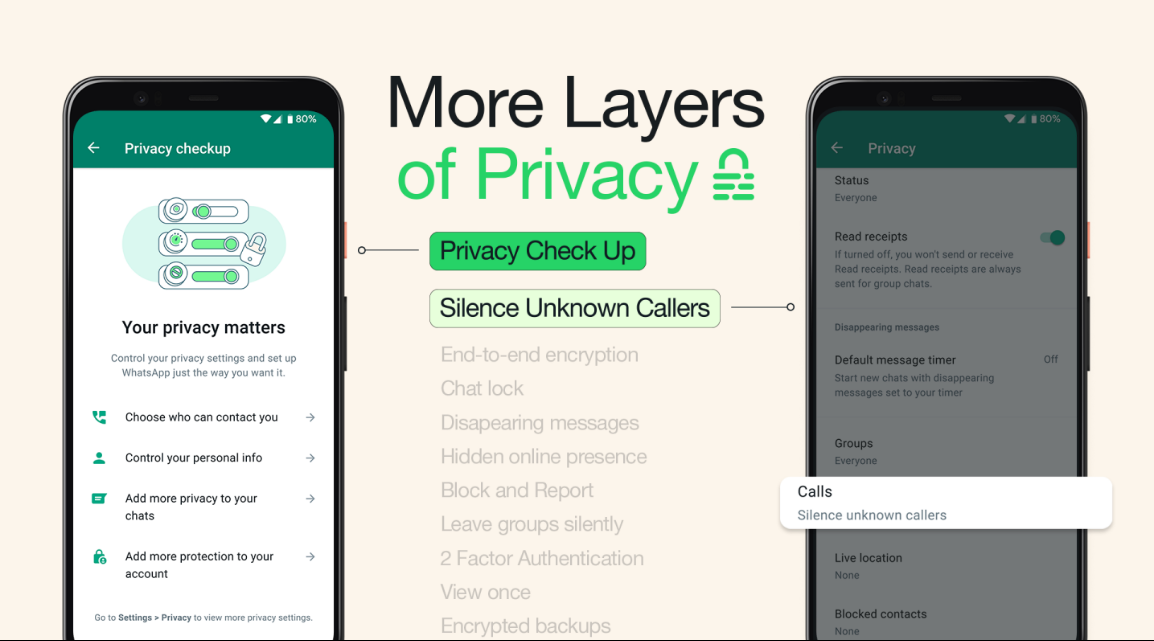
WhatsApp has evolved into a highly secure communication platform, but most users still rely on default settings. In reality, understanding WhatsApp Best privacy and security features in 2026 is essential to protect personal chats, files, and identity from modern digital threats.
In recent years, cyber risks, scams, and unauthorized access have increased rapidly. That is why learning WhatsApp Best privacy and security features in 2026 is no longer optional for daily users.
WhatsApp is now used not only for chatting but also for business communication, online classes, payments, file sharing, and professional discussions. Because of this expanded usage, privacy mistakes can cause serious problems such as data leaks, impersonation, and account takeover. Proper settings help users stay safe without using any third-party apps. To explore more advanced hidden tools beyond privacy settings, readers can also check WhatsApp Secret Features in 2026.
Why WhatsApp Privacy Matters More Than Ever
Messaging apps store sensitive personal and professional information. By enabling WhatsApp privacy and security features in 2026, users gain control over who can see their data, activity, and conversations.
Strong privacy settings reduce the risk of spying, account hijacking, and data misuse. Many users assume WhatsApp is fully secure by default, but real protection comes only when users manually enable and customize the available options.
In 2026, WhatsApp focuses heavily on user-controlled privacy instead of forced restrictions. This means users decide how visible they want to be. For official details about data handling and privacy rules, users can review WhatsApp’s official privacy policy.
1. Chat Lock with Biometric Protection
Chat Lock is one of the strongest tools included in WhatsApp Best privacy and security features in 2026.
This feature allows users to lock specific chats using fingerprint or face unlock, ensuring private conversations remain protected even if someone accesses the phone.
Extra benefits:
- Locked chats disappear from the main chat list
- Notifications hide message content
- Adds a second security layer inside the app
This is especially useful for shared phones or work environments. Users can also explore WhatsApp’s Help Center to learn more about built-in security and privacy features.
2. Screenshot Blocking for Locked Chats
Another powerful option in WhatsApp Best privacy and security features in 2026 is screenshot restriction.
This prevents others from capturing sensitive messages, photos, or confidential details shared in locked chats.
Why this matters:
- Stops accidental leaks
- Protects private information
- Reduces misuse of screenshots
It is ideal for financial details, personal photos, or confidential discussions.
3. Hide Online Status and Last Seen
Online status reveals user activity patterns. Among WhatsApp Best privacy and security features in 2026, the ability to hide online status helps users avoid tracking and unnecessary pressure.
Users can:
- Hide online status from everyone
- Show it only to selected contacts
- Match online status with last seen visibility
This gives full control over digital presence.
4. Silence Unknown Callers
Spam and scam calls are a growing problem. One of the most practical WhatsApp Best privacy and security features in 2026 is silencing unknown callers.
This feature automatically mutes calls from unknown numbers while still allowing them to appear in call history.
Benefits include:
- Fewer interruptions
- Reduced scam exposure
- Better focus and peace of mind
5. Two-Step Verification for Account Protection
Two-step verification is a critical layer within WhatsApp Best privacy and security features in 2026.
It adds a PIN requirement during account registration on new devices, preventing unauthorized access even if someone gets your OTP. For complete mobile safety beyond WhatsApp, readers should also read How to Protect Phone from Hacking, which explains essential smartphone security practices.
Best practice:
- Use a strong PIN
- Add a recovery email
- Never share the PIN
This single setting protects against most account hijacking attempts. For broader account protection and security awareness, users can visit Meta’s official security resource center.
6. Profile Photo and About Section Control
Users can restrict who sees their profile photo and personal info. These controls are core parts of WhatsApp Best privacy and security features in 2026.
You can hide your profile photo from unknown users, preventing misuse or impersonation.
7. Group Invitation Control
Being added to unknown groups can be annoying and unsafe. With WhatsApp Best privacy and security features in 2026, users can control who is allowed to add them to groups.
This helps:
- Stop spam groups
- Avoid scam invitations
- Reduce unnecessary notifications
8. End-to-End Encrypted Backups
Encrypted backups protect chats stored in cloud services. This option is one of the most important WhatsApp Best privacy and security features in 2026.
Without encryption, cloud backups may be vulnerable. Enabling this feature ensures only you can access your backup data.
9. View Once Media for Sensitive Content
WhatsApp allows photos, videos, and voice notes to disappear after one view. This feature strengthens WhatsApp Best privacy and security features in 2026 by reducing long-term data exposure.
This is ideal for OTPs, private images, and temporary information.
10. Linked Device Management
WhatsApp supports multi-device usage, but monitoring linked devices is essential. Device control is a vital part of WhatsApp Best Best privacy and security features in 2026.
Users should:
- Regularly check linked devices
- Remove unused or unknown devices
- Log out remotely if needed
11. Notification Privacy Settings
Lock-screen notifications can reveal private messages. Adjusting notification visibility is another smart step in WhatsApp Best Best privacy and security features in 2026.
Hiding previews ensures privacy even when your phone is on a desk or in public.
12. Reporting and Blocking Suspicious Accounts
Reporting spam and suspicious accounts helps improve platform safety. This option completes the set of WhatsApp Best privacy and security features in 2026 that users should actively use.
Blocking and reporting also helps WhatsApp identify scam networks faster.
Common Privacy Mistakes Users Still Make
Many users still:
- Leave default privacy settings unchanged
- Ignore two-step verification
- Share screenshots of private chats
- Allow unknown group invitations
Avoiding these mistakes significantly improves security.
Who Should Enable These Features?
These privacy and security tools are essential for:
- Students
- Professionals
- Business owners
- Freelancers
- Parents
- Journalists
Anyone who uses WhatsApp daily should customize these settings. Along with privacy tools, using the right applications also improves daily digital safety, so readers can explore Best Android Apps for Daily Life for useful app recommendations.
Conclusion
WhatsApp offers powerful built-in protection tools, but their effectiveness depends on user awareness. By enabling the right options and understanding how they work, users can enjoy safe, private, and stress-free communication.
Spending a few minutes on privacy settings today can prevent serious digital risks tomorrow. In 2026, smart users are those who take control of their privacy instead of leaving it to default settings.